AI Agents in Production: Tools, Loops and Guardrails
From chatbots to software that acts. The architecture of reliable agents and the patterns that keep them safe.
Key takeaways
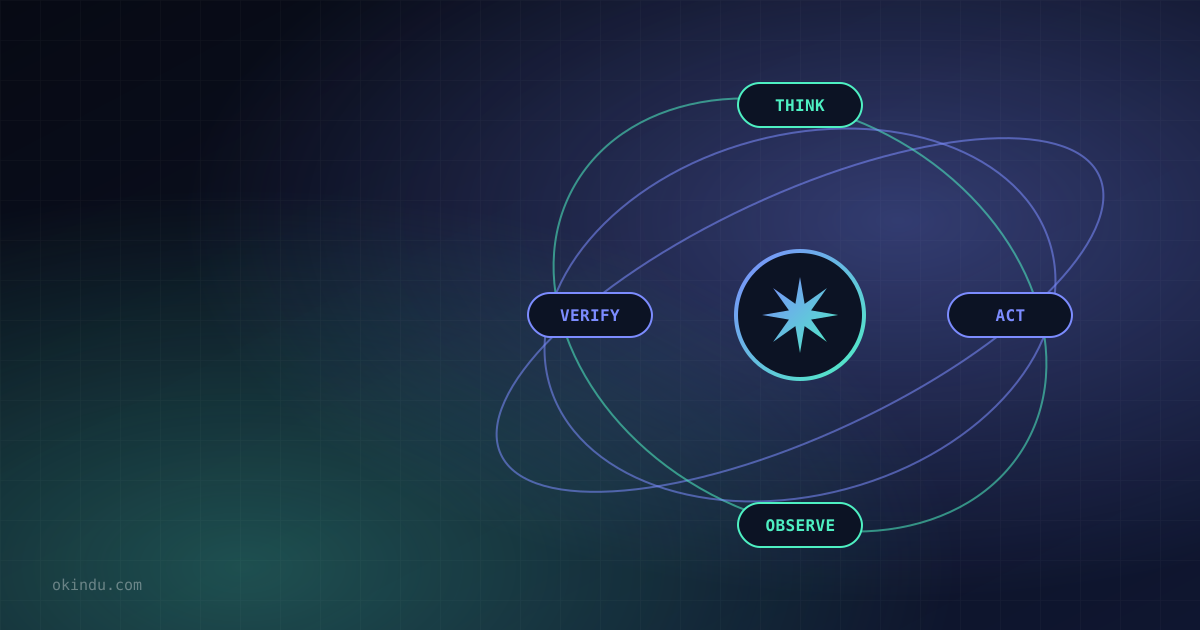
- An agent is a model running in a loop: it chooses tools, observes results and decides the next step until the goal is met.
- Start with the simplest design — a single call or a fixed workflow — and use agents only when tasks are open-ended.
- Tool design (clear names, descriptions, schemas and error messages) has an outsized effect on reliability.
- Context management — compaction, memory and sub-agents — is the key to long-running tasks.
- Guardrails: least-privilege tools, sandboxes, human approval for risky actions, and evals that measure task success.
A chatbot answers questions. An agent gets things done: it reads a bug report, searches the codebase, edits files, runs tests and opens a pull request. The shift from chat to agents is the defining trend of AI in 2025–2026. This guide covers how agents work and the engineering practices that make them reliable enough for production.
Workflows vs agents
A useful distinction:
- Workflows — LLM calls orchestrated by code along predefined paths: prompt chaining, routing, parallel fan-out, or an evaluator that checks another model's output.
- Agents — the model dynamically decides which tools to use and in what order, running until it judges the task complete.
Agents trade predictability and cost for flexibility. Before building one, ask: Is the task hard to specify in advance? Is the outcome valuable enough to justify more tokens and latency? Can mistakes be caught (tests, review, rollback)? If not, a workflow is often better.
The agent loop
Here is the core of a manual tool-use loop with the Anthropic Python SDK. The model returns tool_use blocks; your code runs them and sends back tool_result blocks:
import anthropic
client = anthropic.Anthropic() # reads ANTHROPIC_API_KEY from the environment
tools = [{
"name": "run_tests",
"description": "Run the project's unit tests and return the summary output.",
"input_schema": {
"type": "object",
"properties": {"path": {"type": "string", "description": "Test file or directory"}},
"required": ["path"],
},
}]
def run_tool(name, args):
if name == "run_tests":
return "42 passed, 1 failed: test_parse_dates" # call your real tool here
return f"Unknown tool: {name}"
messages = [{"role": "user", "content": "Find out why the test suite fails."}]
while True:
response = client.messages.create(
model="claude-opus-5-5",
max_tokens=16000,
tools=tools,
messages=messages,
)
# keep the full content (including thinking blocks) in the history
messages.append({"role": "assistant", "content": response.content})
if response.stop_reason != "tool_use":
break
results = []
for block in response.content:
if block.type == "tool_use":
output = run_tool(block.name, block.input)
results.append({"type": "tool_result", "tool_use_id": block.id, "content": output})
# return all tool results together in one user message
messages.append({"role": "user", "content": results})
for block in response.content:
if block.type == "text":
print(block.text)Production systems wrap this loop with step limits, logging, error handling and approval gates — or use a framework that provides them, such as the SDK's tool runner, the Claude Agent SDK, or a hosted agent service.
Tool design is prompt engineering
The model only knows what your tool definitions tell it. The most common source of agent failures is ambiguous tools.
- Clear names and descriptions — say what the tool does, when to use it, and what it returns.
- Tight schemas — enums, required fields and examples reduce invalid calls. Strict schema validation can guarantee well-formed inputs.
- Helpful errors — return actionable error messages ("date must be YYYY-MM-DD") so the model can self-correct.
- Right-sized outputs — paginate and summarize; dumping 100,000 tokens of logs into context degrades performance.
- Fewer, better tools — consolidate overlapping tools. For large tool catalogs, use tool search so only relevant definitions are loaded.
Managing context on long tasks
Agents accumulate context fast. Even with million-token windows, long tasks need deliberate context engineering:
- Compaction — summarize older history when the context grows large, keeping decisions and state.
- Clearing stale tool results — old file reads and search results can be dropped once used.
- External memory — let the agent write notes, plans and progress to files it can re-read.
- Sub-agents — delegate reading-heavy subtasks to separate agents with fresh context, returning only conclusions.
- Prompt caching — keep the prefix stable so each loop iteration reuses cached computation.
Guardrails and safety
| Risk | Mitigation |
|---|---|
| Destructive actions (deleting data, force-pushing) | Human approval for irreversible or outward-facing actions; dry-run modes |
| Prompt injection via tool output | Treat retrieved content as data; isolate untrusted inputs; limit what tools a session can reach |
| Over-broad credentials | Least-privilege, short-lived, scoped tokens per task |
| Runaway cost | Step limits, token budgets, timeouts and alerting |
| Code execution | Sandboxed containers with restricted network egress |
Evaluating agents
Agents are evaluated on outcomes, not single responses:
- Build task suites with automatic graders — tests pass, the database ends in the right state, the ticket is resolved.
- Run each task several times; agent behavior varies, so track success rates and variance.
- Read transcripts. Aggregate scores hide whether failures come from tools, context or reasoning.
- Track cost and latency per successful task alongside accuracy.
Where agents work today
- Software engineering — the most mature domain: bug fixing, refactoring, test writing, code review and migrations.
- Research and analysis — multi-source web research, data analysis, report generation.
- Customer operations — resolving support tickets with access to account systems under policy constraints.
- IT and DevOps — triaging alerts, investigating incidents, running runbooks with approvals.
Agents connect to these systems increasingly through the Model Context Protocol. For a step-by-step start, see Build an AI App with Claude on AWS.